I am having trouble connecting my CentOS 7 guest to the internet. My VirtualBox Network configuration is as follows:
Adapter 1: NAT; Adapter 2: Host-Only (vboxnet0) vboxnet0 is connected set up with DHCP with default VirtualBox parameters.
In my CentOS Guest, I commanded ip a and got the following:
enp0s3: 10.0.2.15/24 (NAT adapter) enp0s8: 192.168.56.102/24 (Host-Only adapter) I can connect to my VirtualBox from my host machine:
ping 192.168.56.102 can transmit and receive packets.
However, my VirtualBox cannot access the internet:
ping outputs "unknown host "
Here is my ifcfg-enp0s3:
TYPE=Ethernet BOOTPROTO=dhcp DEFROUTE=yes PEERDNS=yes IPV4_FAILURE_FATAL=no IPV6_INIT=yes IPV6_AUTOCONF=yes IPV6_DEFROUTE=yes IPV6_PEERDNS=yes IPV6_PEERROUTES=yes IPV6_FAILURE_FATAL=no NAME=enp0s3 UUID=UUID HERE (sorry I cannot copy from my guest host yet, no Guest Additions and it was too long) DEVICE=enp0s3 ONBOOT=yes Why can't my guest connect to the internet?
4 Answers
As Gasim said:
Add the following to /etc/sysconfig/network-scripts/ifcfg-enp0s3
DNS1=8.8.8.8 DNS2=8.8.4.4 # Note this was set to no ONBOOT=yes Network connection is not active by default. You can check this by running the command:
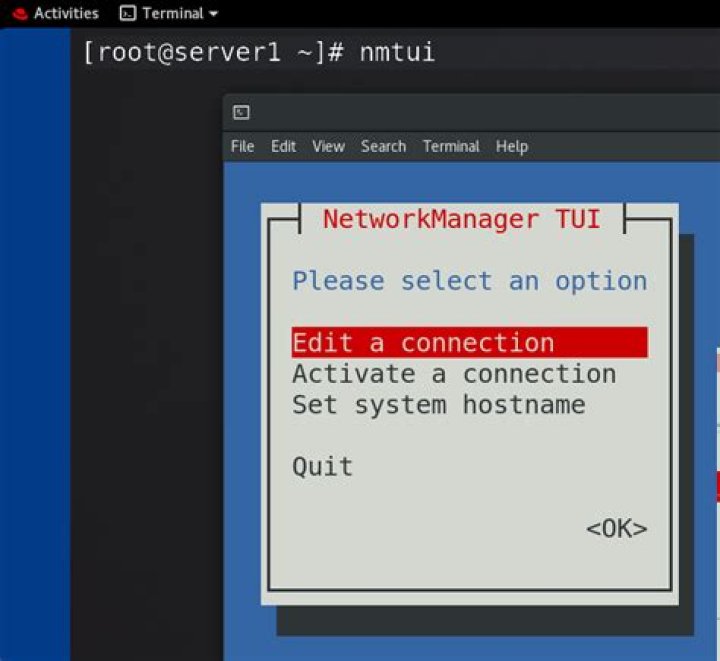
nmcli d To edit the connection run the following command:
nmtui - Edit a connection
- Choose your Ethernet connection
Check the option "Automatically connect" as shown in the pic below:
systemctl restart network
- sudo shutdown -r now
Chances are that in /etc/resolv.conf you don't have any nameservers set, in which case you want to do:
vim /etc/resolv.conf
and add:
nameserver 8.8.8.8 nameserver 8.8.4.4 save it, and once back at the shell
do:
sudo reboot now to reboot and you should have internet access
In VirtualBox for CentOS 7 VM, I faced the same issue.
You dont need to configure these files. The DNS is set via the Network Manager. On the bottom right hand corner if you see the two monitor thingy, just right click on that and connect the network adapter.
Even though you change the resolv.conf file by adding the DNS, the DNS set at your host machine/DNS set by your service provide over rides it.
And the resolv.conf gets updated as follows -
1Generated by NetworkManager
search XXX#.XX.comcast.net
nameserver 75.75.76.76
nameserver 75.75.75.75