After a search, how do I get to know in which OU (Organizational Unit) a given result is?
3 Answers
From the menu select "Edit"->"Choose Columns"->"Distinguished Name"
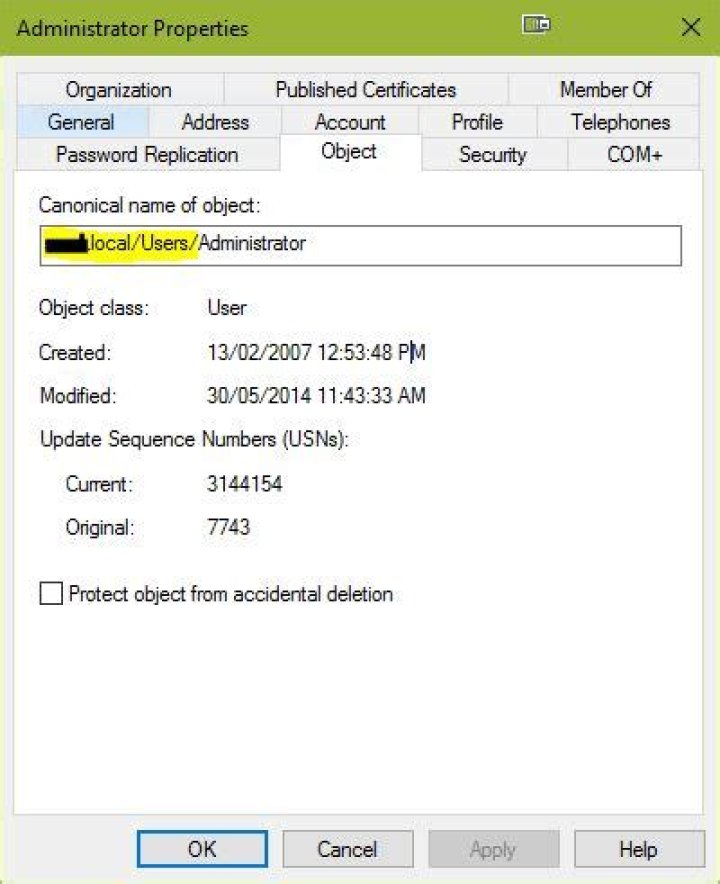
3- Right-click the user, and select Properties.
- Click the "Object" tab.
- The OU path is shown in the "Canonical Name of object" field.
*Note: For the Object tab to be visible, you will need to activate the Advanced Feature view via the main MMC menu:
From the user properties window, you'll have tabs that says Object.
In Canonical name of object:
You'll see the complete path showing the OU of that user.
I hope that helps.




