Before Windows 10, one could get all of the VersionInfo strings by right clicking on a file and doing properties. That doesn't work anymore. It's like somebody only decided to show the ones that acquired a standard meaning over the decades. But the GUI doesn't matter except for noting it doesn't work so COM calls to the property page won't help. We want to know how from the command line anyway.
Tried:
PS> get-childitem .\execautablename | FormatList VersionInfo PS> (get-item .\execautablename | format-list -force) PS> get-childitem .\execautablename | ? {$_.VersionInfo.Xyz} cmd> wmic datafile where Name="C:\\Full\\Path\\to\\executablename.exe" list full The third command can get only some version strings but not others I know are there.
Its like all of the ways now know a "standard" list (there's two or three ideas of what the standard list is) and none of them know how to enumerate all the VersionInfo strings anymore. I have a binary with the string "ProductHash" which is the git commit hash of the corresponding source code used to compile it.
I keep on getting answers suggested involving {$_.VersionInfo}. That path is never going to work because VersionInfo believes in a fixed list of versioninfo properties to retrieve. The rc compiler and the VERSIONINFO PE structure believe differently. And wmic has a different fixed list that it retrieves.
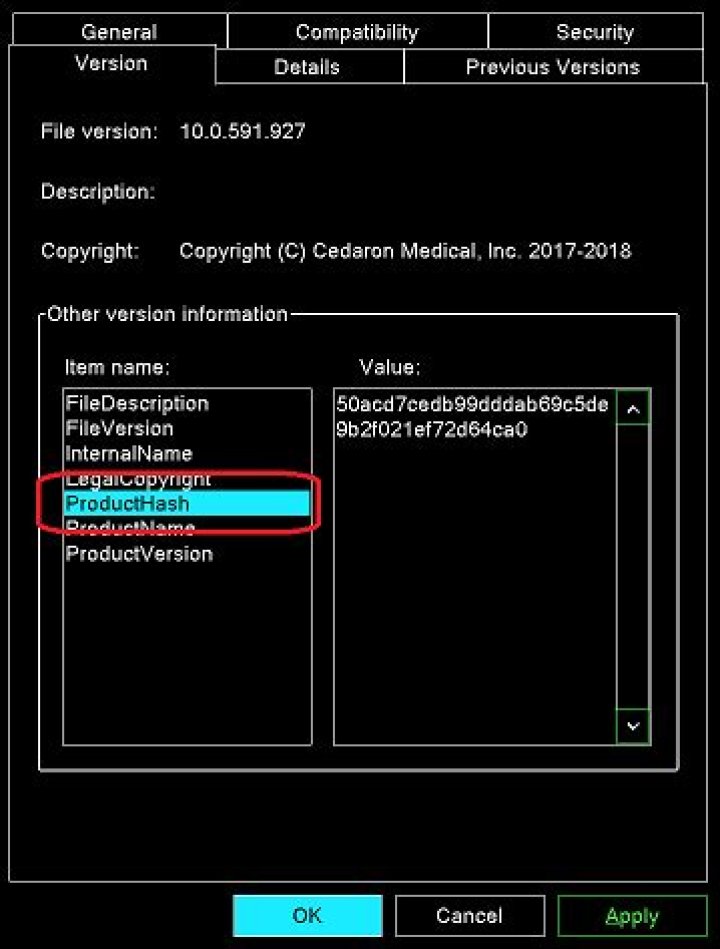
This is the property. It only showed up at all after applying Fish's VersInfoEx shell extension linked by postanote.
Source snippit (windows resource):
#include <windows.h> 1 VERSIONINFO FILEVERSION 10, 0, 0, 0 PRODUCTVERSION 10, 0, 0, 0 FILEFLAGSMASK 0 FILEFLAGS 0 FILEOS VOS_NT_WINDOWS32 FILETYPE VFT_APP BEGIN BLOCK "StringFileInfo" BEGIN BLOCK "040904E4" BEGIN VALUE "FileDescription", "Hello RC" VALUE "FileVersion", "10.0.0.0" VALUE "LegalCopyright", "Copyright (C) Cedaron Medical, Inc. 2018" VALUE "InternalName", "hellorc" VALUE "ProductHash", "Hello_World_abcdefgh" /* this is the value I'm after */ VALUE "ProductName", "Hello RC" VALUE "ProductVersion", "10.0.0.0" END END BLOCK "VarFileInfo" BEGIN VALUE "Translation", 0x409, 1252 END END I managed to get a truly horrible and unsatisfying answer that doesn't know anything about VERSIONINFO and reads in megabytes of file and depends on way too much being installed.
cmd> c:\cygwin64\bin\tr -d \0 < filename.exe | c:\cygwin64\bin\strings | c:\cygwin64\bin\grep ^^ProductHash. | c:\cygwin64\bin\sed s/ProductHash// This works provided the VERSIONINFO string name being searched for isn't also somewhere else in the binary. I'm hoping a bad answer suffices to explain the question better.
Trying to do the same thing with powershell as suggested by Pimp Juice IT didn't quite work:
PS> Get-Content ".\executablename.exe" | % { if($_ -match "ProductHash") { write-host $_}} PS> It was close enough to a working idea that I was able to determine why it yielded no output. I stuck cygwin's tr back into the pipeline and the command took so long to run I thought it had hung but I eventually got some output.
PS> Get-Content ".\executablename.exe" | c:\cygwin64\bin\tr.exe -d \0 | % { if($_ -match "ProductHash") { write-host $_}} InternalNameexecutablenameh$ProductNameMyProductPProductVersion10.0.591.927r)ProductHash50acd7cedb99dddab69c5de9b2f021ef72d64ca0DVarFileInfo$Translation ????<?xml version="1.0" encoding="UTF-8" standalone="yes"?> PS> I have made a minimal binary hello.zip (1313 bytes, decompresses to 4096 bytes). The versioninfo key "ProductHash" has the value "Hello_World_abcdefgh".
Do not be deceived. ProductHash isn't a hash of the binary. It's a hash key into the source code repository to find the source code the binary was compiled from. The idea is if someone ends up with some strange version, we can track it down and determine exactly what code they have. Rather than have the the customer send us a large file, we would rather send them a small command to get the value out of it.
23 Answers
Final Working Solution Logic
This script takes into account the actual layout of the versioninfo structure, and works with one extra parameter (the 1 or 2 near the end) for the parity of the input string.
$versioninfostate = 0 (Get-Content "hello.exe" -Encoding Unicode) -split {$_ -lt " "} | % { if ($versioninfostate -eq 1) { write-host $_ } if ($versioninfostate -gt 0) { $versioninfostate = $versioninfostate - 1} if ($_ -match "ProductHash$") { $versioninfostate = 2 }} Development of the Final Solution Path
- "The last command can get only some version strings but not others I know are there"
Use
Select *to get additional properties not shown with justFormat-List- "Get all of the VersionInfo strings from a .exe file"
Pipe the exe over to
% {$_.VersionInfo}to useForeach-Objectrather thanWhere-Objectwith$_.VersionInfozeroing in on just its properties in one list/record set- "Cannot resolve arbitrary property names"
Actually using the #1 & #2 as listed above you can (see below)
- "As per your latest update showing you installed a third party utility recommended by someone to you in a comment; that software seems to be from 2010 and designed specifically for Windows 7. In any case, it seems to add an additional property named
ProductHashas per your latest update screen shot."
Use
Get-FileHashand then explicitly get the hash value of the exe that way

Below is some PowerShell logic that. . .
- Uses
%instead of?to put the executable through Foreach-Object rather thanWhere-Object - Uses
Select *instead ofFormat-Listto ensure the variable object is of aSystem.ObjectBaseType rather than aSystem.ArrayasFormat-Listcreates - Sets a variable with the explicit property value as you specify from the
VersionInfolist - Uses Get-FileHash to get the exe hash value
PowerShell
$t = get-childitem ".\executablename" | % {$_.VersionInfo} | Select * $Hash = (Get-FileHash $Exe).Hash $t.<Property>, $Hash Output Example
Coolest - 30E14E358DD76EC712CCC6B5FD1E79DDEAA653E682E968DA0229BE13BED2B991 VersionInfo List Object
PS C:\WINDOWS\system32> get-childitem ".\executablename" | % {$_.VersionInfo} | Select * FileVersionRaw : 1.80.0.0 ProductVersionRaw : 1.80.0.0 Comments : CompanyName : Coolest - FileBuildPart : 0 FileDescription : Program - Cool memory analyzer FileMajorPart : 1 FileMinorPart : 80 FileName : C:\Users\User\Desktop\Coolio.exe FilePrivatePart : 0 FileVersion : 1.80 InternalName : TooCool IsDebug : False IsPatched : False IsPrivateBuild : False IsPreRelease : False IsSpecialBuild : False Language : English (United States) LegalCopyright : Copyright © 1985-2099 Michael Jordan LegalTrademarks : OriginalFilename : Coolio PrivateBuild : ProductBuildPart : 0 ProductMajorPart : 1 ProductMinorPart : 80 ProductName : TooCool ProductPrivatePart : 0 ProductVersion : 1.80 SpecialBuild : Search Binary String Content
Note: Just as the cygwin cli string, grep, and other commands search the binary of the file to match the string "ProductHash", you can read this from similar PowerShell commands as well.
$Match = (Get-Content ".\executablename") -replace "`0", "" | % {if($_ -match "(ProductHash)") {$Matches[0]}} $Line = (Get-Content ".\executablename") -replace "`0", "" | % {if($_ -match "(ProductHash)") {$_}} | % {if($_ -match "(ProductHash).*$") {$Matches[0]}} $Line = $Line -replace "[\W]", "`r`n" | % {if($_ -match "(ProductHash).*\s") {$Matches[0]}} $MisMatch = $Line.Replace($Match, "") Write-Output "$Match`: $MisMatch" Example Output
ProductHash: Hello_World_abcdefgh2
Further Resources
0I just did this on an executable and I see the version info on the details tab. So, I am kind of loss about what you mean by this.
This PS approach is also documented here:
On my Win10 client
(Get-CimInstance -CimInstance Win32_OperatingSystem).Caption Microsoft Windows 10 Pro $PSVersionTable Name Value ---- ----- PSVersion 5.1.17134.228 PSEdition Desktop PSCompatibleVersions {1.0, 2.0, 3.0, 4.0, 5.0, 5.1.17134.228} BuildVersion 10.0.17134.228 CLRVersion 4.0.30319.42000 WSManStackVersion 3.0 PSRemotingProtocolVersion 2.3 SerializationVersion 1.1.0.1 (Get-Item -Path 'F:\Downloads\WindowsAzureADRightsManagementAdministration_x64.exe').VersionInfo | Format-List -Force OriginalFilename : setup.exe FileDescription : Software Installer ProductName : Windows Azure AD Rights Management Administration Comments : CompanyName : Microsoft Corporation FileName : F:\Downloads\WindowsAzureADRightsManagementAdministration_x64.exe FileVersion : 1.0.594.1 ProductVersion : 1.0.594.1 IsDebug : False IsPatched : False IsPreRelease : False IsPrivateBuild : False IsSpecialBuild : False Language : English (United States) LegalCopyright : Copyright (c) Microsoft Corporation. All rights reserved. LegalTrademarks : Microsoft and Windows are either registered trademarks or trademarks of Microsoft Corporation in the U.S. and/or other countries. PrivateBuild : ************************************** SpecialBuild : FileVersionRaw : 1.0.594.1 ProductVersionRaw : 1.0.594.1 Firefox.exe has special a Resource: BuildID. Java.exe also has special a Resource: Full Version.
Powershell's FileVersion cannot parse these.
Thanks to @Vomit IT - Chunky Mess Style commands, I can get version numbers.
On CMD;
For Firefox.exe:
powershell -c "(Get-Content 'Firefox.exe' -Encoding Unicode) -split {$_ -lt ' '} | % { if ($versioninfostate -eq 1) { write-host $_ } if ($versioninfostate -gt 0) { $versioninfostate = $versioninfostate - 1} if ($_ -match 'BuildID$') { $versioninfostate = 2 } }"
For Java.exe:
powershell -c "(Get-Content 'java.exe' -Encoding Unicode) -split {$_ -lt '-'} | % { if ($versioninfostate -eq 1) { write-host $_ } if ($versioninfostate -gt 0) { $versioninfostate = $versioninfostate - 1} if ($_ -match 'Full Version$') { $versioninfostate = 1 } }"




