In the Audacity Audio Editor, in Effect, there is an option for Change Pitch. You can see in the below photo Down and Percent Change. I usually select Down and change the value of Percent Change to -19000.

I want to similarly change audio pitch while playing video, and do it live (not using a video editor).
Is there a way to do this with VLC Media Player? I have searched, but I didn't find these options. If it isn't possible with VLC, I would be open to a solution using any other media player.
02 Answers
From Change Video Pitch Using the VideoLAN (VLC) Player :
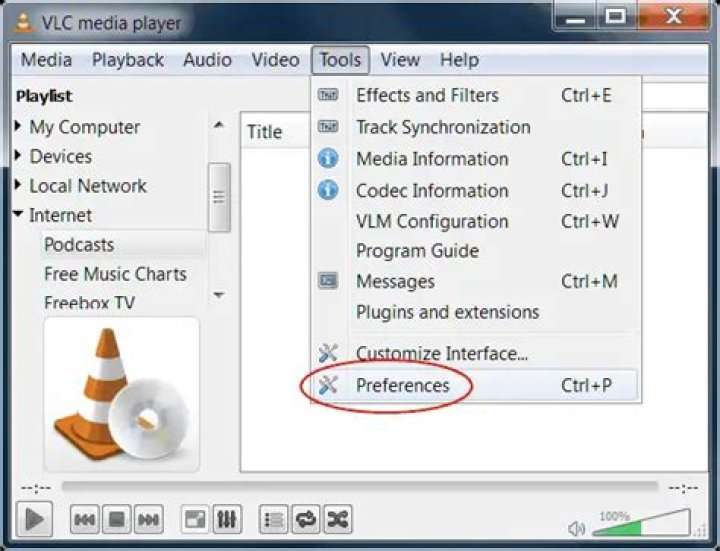
Open your VLC player. Under Tools, click Preferences, at the bottom. Now, click Audio, at the top. Untick Enable Time-Stretching audio. SAVE.
If you play a normal video, nothing else is required. But if you find a video that you are playing needs a pace and pitch adjustment, quickly click on Playback, Speed, and try (at first) clicking on the appropriate fine speed adjustment.
From How to Change the Pitch in Windows Media Player :
Open the audio or video file in Windows Media Player. If the file is playing in the Library window, click the bottom-right "Switch to Now Playing" button. Step
Right-click anywhere in the Now Playing window, point to "Enhancements" and then select "Graphic Equalizer."
Select the graphic mode you prefer, such as individual adjustments or loose/fine groups. The icon next to the selection describes it, and a textual description appears if you hover your mouse pointer over the option. Step
Click and drag the sliders to change the pitch. You might notice the greatest effect around the 2 KHz slider, but what produces the most effect varies between people.
Click the small "X" at the top right of the Graphic Equalizer pop-up to close the utility.

Yes, VLC can do this. Go to:
Tools -> "Effects and Filters" -> Audio -> Advanced
It can adjust the pitch (without changing tempo) up to one octave (12 semitones) up or down. It indicates fractional semitones as x.0 x.3 x.5 x.8 . (I don't know if these are actually steps of quarters of semitones (ie eighth-tones) or "continuous" or what.)
I know that this feature works on vlc 3.0.4 (Linux), but I have no idea when the feature was introduced.
(BTW, this seems to be essentially the same as this question)




