I create a new virtual machine in Hyper-V (generation 2, guest GPT, host GPT), then I installed Windows 10 on it. It works well.
Then I wanted to natively boot on the newly created VHDX.
I used diskpart to assign the letter W: to the Windows partition.
I did bcdboot W:\Windows /d to add a new entry in the boot menu.
When I select my new entry in the boot menu, the computer restart and failed with the inaccessible boot device error on a BSOD.
Does anyone know what I missed or how to get more details to fix this issue?
Additional info:
- BitLocker encrypts the C: drive where the host is running and where the VHDX is stored
In Disk Management, Disk 0 is the physical disk and Disk 1 is the mounted VHDX. 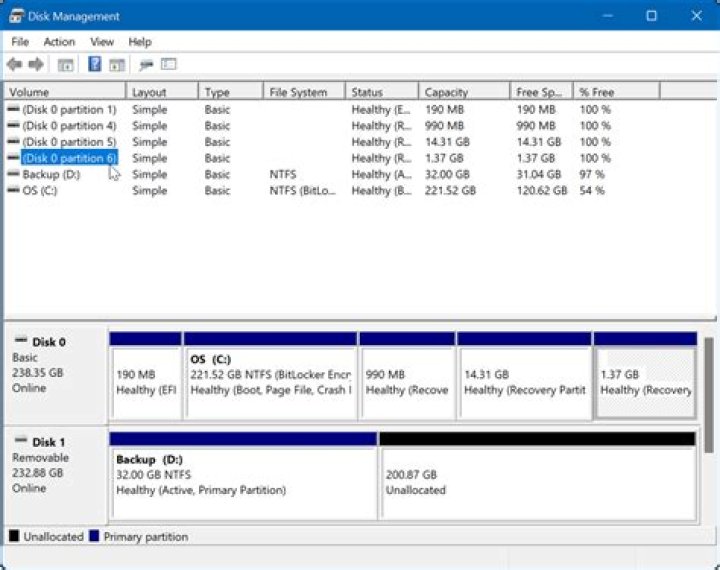
Added bootloader entry:
identifier {20ef5b6c-8f46-11ec-ba9a-3887d5b5cb14} device vhd=[C:]\Users\Public\Documents\Hyper-V\Virtual hard disks\Windows.vhdx,locate=custom:12000002 path \Windows\system32\winload.efi description Windows VHDX locale en-us inherit {6efb52bf-1766-41db-a6b3-0ee5eff72bd7} isolatedcontext Yes allowedinmemorysettings 0x15000075 osdevice vhd=[C:]\Users\Public\Documents\Hyper-V\Virtual hard disks\Windows.vhdx,locate=custom:22000002 systemroot \Windows resumeobject {20ef5b6b-8f46-11ec-ba9a-3887d5b5cb14} nx OptIn bootmenupolicy Standard 



