My DNS contains two records for ServerA:
- an A record with its IPv4 address: 10.25.46.130
- an AAAA record with its IPv6 address: fda8:6c3:ce53:a890::55
I am not able to get my SimpleClient.java program (source at the end of this post) on a Windows server to list the IPv6 address of ServerA using InetAddress.getAllByName(), even when configuring the JVM with -Djava.net.preferIPv6Addresses=true.
The same test running on an IPv6 enabled Linux server is successful.
Configuration details:
- Windows: Server 2019 Standard (10.0.17763)
- Java: OpenJDK 11.0.5+
The output of ipconfig on the Windows server shows that IPv6 seems enabled:
> ipconfig Windows IP Configuration Ethernet adapter Ethernet: Connection-specific DNS Suffix . : IPv4 Address. . . . . . . . . . . : 10.25.0.214 Subnet Mask . . . . . . . . . . . : X.X.X.X Default Gateway . . . . . . . . . : X.X.X.X Ethernet adapter Ethernet 2: Connection-specific DNS Suffix . : fr.company.com IPv6 Address. . . . . . . . . . . : fda8:6c3:ce53:a890::3 Link-local IPv6 Address . . . . . : X.X.X.X::X Default Gateway . . . . . . . . . : X.X.X.X::X The nslookup output from the Windows server is the expected one:
> nslookup ServerA Server: dns.fr.company.com Address: X.X.X.X Non-authoritative answer: Name: ServerA.fr.company.com Addresses: fda8:6c3:ce53:a890::55 10.25.46.130 I am able to successfully run ping -6 ServerA from the Windows server:
> ping -6 ServerA Pinging ServerA.fr.company.com [fda8:6c3:ce53:a890::55] with 32 bytes of data: Reply from fda8:6c3:ce53:a890::55: time<1ms Reply from fda8:6c3:ce53:a890::55: time<1ms Below is the expected output running from an IPv6 enabled Linux server:
# IPv4 (default) $ java SimpleClient.java ServerA 12345 preferIPv6Addresses: null InetAddress.getByName() ServerA/10.25.46.130 InetAddress.getAllByName() ServerA/10.25.46.130 ServerA/fda8:6c3:ce53:a890:0:0:0:55 # IPv6 $ java -Djava.net.preferIPv6Addresses=true SimpleClient.java ServerA 12345 preferIPv6Addresses: true InetAddress.getByName() ServerA/fda8:6c3:ce53:a890:0:0:0:55 InetAddress.getAllByName() ServerA/fda8:6c3:ce53:a890:0:0:0:55 ServerA/10.25.46.130 The same test failing on the Windows server:
# IPv4 (default) > java SimpleClient.java ServerA 12345 preferIPv6Addresses: null InetAddress.getByName() ServerA/10.25.46.130 InetAddress.getAllByName() ServerA/10.25.46.130 # IPv6 > java -Djava.net.preferIPv6Addresses=true SimpleClient.java ServerA 12345 preferIPv6Addresses: true InetAddress.getByName() ServerA/10.25.46.130 InetAddress.getAllByName() ServerA/10.25.46.130 On the Windows server, the call to InetAddress.getAllByName() is only returning a single IPv4 address and not both an IPv4 and IPv6 address like as expected on the Linux IPv6 enabled server.
I can reproduce the same behavior on a Linux server with IPv6 disabled (grub and kernel settings):
# IPv4 (default) $ java SimpleClient.java ServerA 12345 preferIPv6Addresses: null InetAddress.getByName() ServerA/10.25.46.130 InetAddress.getAllByName() ServerA/10.25.46.130 # IPv6 $ java -Djava.net.preferIPv6Addresses=true SimpleClient.java ServerA 12345 preferIPv6Addresses: true InetAddress.getByName() ServerA/10.25.46.130 InetAddress.getAllByName() ServerA/10.25.46.130 From these tests, I conclude that something is wrong somewhere on the IPv6 configuration of the Windows server but I don't know what.
Some notes and stuff I tried:
- Manually adding the IPv6 address of ServerA in C:\Windows\System32\drivers\etc\hosts results in the program to list the IPv6 address, but only this one.
- I did not find a
DisabledComponentskey in the registy for the pathComputer\HKEY_LOCAL_MACHINE\SYSTEM\CurrentControlSet\Services\Tcpip6\Parameters
Below is the code for SampleClient.java:
import java.net.Socket; import java.net.UnknownHostException; import java.net.InetAddress; import java.io.InputStreamReader; import java.io.InputStream; import java.io.BufferedReader; import java.io.IOException; public class SimpleClient { public static void main(String[] args) { if (args.length < 2) return; String hostname = args[0]; System.out.println("preferIPv6Addresses: " + System.getProperty("java.net.preferIPv6Addresses")); try { System.out.println("InetAddress.getByName()"); System.out.println(InetAddress.getByName(hostname)); InetAddress[] addresses = InetAddress.getAllByName(hostname); System.out.println("InetAddress.getAllByName()"); for (InetAddress address : addresses) { System.out.println(address); } } catch (UnknownHostException ex) { System.out.println("Server not found: " + ex.getMessage()); } int port = Integer.parseInt(args[1]); try (Socket socket = new Socket(hostname, port)) { InputStream input = socket.getInputStream(); BufferedReader reader = new BufferedReader(new InputStreamReader(input)); System.out.println(reader.readLine()); } catch (UnknownHostException ex) { System.out.println("Server not found: " + ex.getMessage()); } catch (IOException ex) { System.out.println("I/O error: " + ex.getMessage()); } } } Can somebody hint at something that might be wrong on the Windows server configuration?
Thank you.
EDIT1:
As mentioned in the comments, I also reproduced the issue with Python using socket.getaddrinfo():
- Windows server (no AF_INET6)
>>> socket.getaddrinfo("serverA", 12345) [(<AddressFamily.AF_INET: 2>, 0, 0, '', ('10.25.46.130', 12345))] - Linux server (both AF_INET6 and AF_INET)
>>> socket.getaddrinfo("serverA", 12345) [(<AddressFamily.AF_INET: 2>, <SocketKind.SOCK_STREAM: 1>, 6, '', ('10.25.46.130', 12345)), (<AddressFamily.AF_INET: 2>, <SocketKind.SOCK_DGRAM: 2>, 17, '', ('10.25.46.130', 12345)), (<AddressFamily.AF_INET: 2>, <SocketKind.SOCK_RAW: 3>, 0, '', ('10.25.46.130', 12345)), (<AddressFamily.AF_INET6: 10>, <SocketKind.SOCK_STREAM: 1>, 6, '', ('fda8:6c3:ce53:a890::55', 12345, 0, 0)), (<AddressFamily.AF_INET6: 10>, <SocketKind.SOCK_DGRAM: 2>, 17, '', ('fda8:6c3:ce53:a890::55', 12345, 0, 0)), (<AddressFamily.AF_INET6: 10>, <SocketKind.SOCK_RAW: 3>, 0, '', ('fda8:6c3:ce53:a890::55', 12345, 0, 0))] 1 Answer
The answer came from @user1686 in the comments, pointing out that IPv4 and IPv6 were separated on different interfaces.
It seems that our IT provisioned the Windows server with two interfaces, one dedicated for each IP stack:
- Ethernet (IPv4)
- Ethernet4 (IPv6)
I disabled all extra interfaces on the Windows server and kept only the “Ethernet” one:
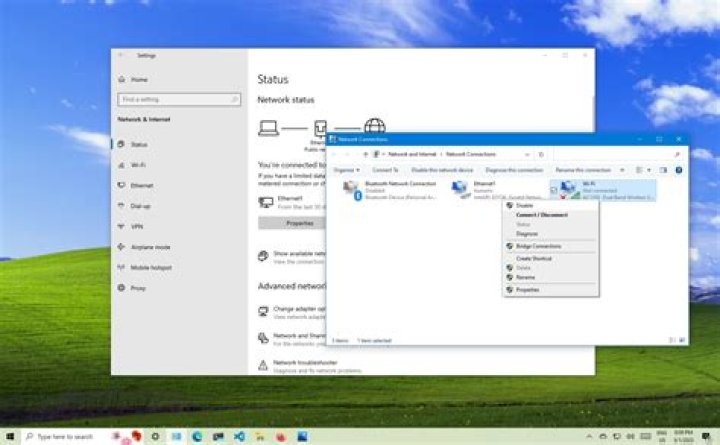
I manually re-configured the IPv6 stack on “Ethernet” by copy pasting the settings and properties from “Ethernet 4”:
The resulting ipconfig shows a single interface with both IPv4 and IPv6:
> ipconfig Windows IP Configuration Ethernet adapter Ethernet: Connection-specific DNS Suffix . : IPv6 Address. . . . . . . . . . . : fda8:6c3:ce53:a890::3 Link-local IPv6 Address . . . . . : fe80::8d10:5083:9a0:9ab8%16 IPv4 Address. . . . . . . . . . . : 10.25.0.214 Subnet Mask . . . . . . . . . . . : Z.Z.Z.Z Default Gateway . . . . . . . . . : Y:Y:Y:Y::T X.X.X.X After this reconfiguration, the test is behaving correctly and lists both the IPv4 and IPv6 addresses for serverA:
# IPv4 > C:\jdk11.0.8\bin\java SimpleClient.java serverA 12345 preferIPv6Addresses: null InetAddress.getByName() serverA/10.25.46.130 InetAddress.getAllByName() serverA/10.25.46.130 serverA/fda8:6c3:ce53:a890:0:0:0:55 # IPv6 > C:\jdk11.0.8\bin\java -Djava.net.preferIPv6Addresses=true SimpleClient.java serverA 12345 preferIPv6Addresses: true InetAddress.getByName() serverA/fda8:6c3:ce53:a890:0:0:0:55 InetAddress.getAllByName() serverA/fda8:6c3:ce53:a890:0:0:0:55 serverA/10.25.46.130 So it definitely seems that trying to segregate IP stacks on different interfaces is not a good idea.




